WEBSITE TEMPLATES       FLASH WEBSITES       FLASH INTROS   

Search Templates     
Flash Tutorials
& Resources
Dreamweaver
Tutorials
Fireworks Tutorials
& Resources
Photoshop
Tutorials
Web Design
Tutorials & Resources
Website Promotion
Tutorials
Website
Add Ons
You are here : : Home > Free Resources > Flash Tutorials & Resources > Free Flash & XML Photo Galleries >Flash and XML Photo Gallery   

Free Flash & XML Photo Gallery

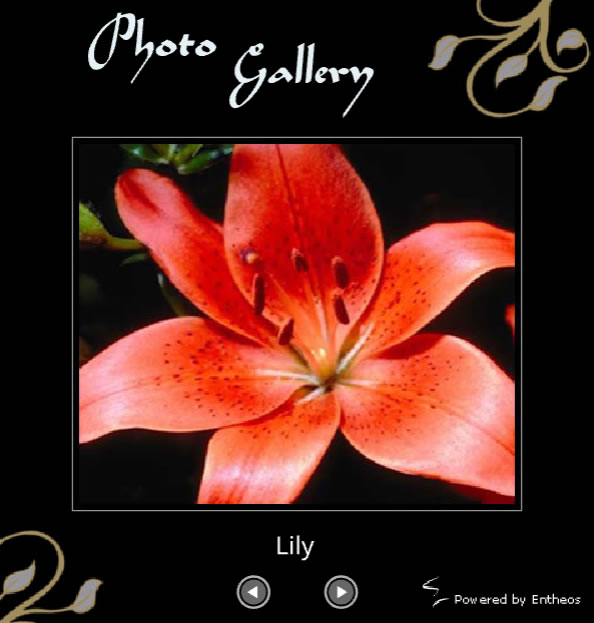
Download our free Flash Photo Gallery with fade in and fade out effect. You don't need the Flash software for editing the gallery. You can easily add, edit or delete pictures by editing the xml file in Notepad. Creating your own Flash photo gallery has never been easier! View the demo below for a simple Flash and XML photo gallery. You need Flash Player 8.0 to view this Flash Photo Gallery. Click here to view all our free Flash Photo Galleries.

Demo |  Download Now!                                    Downloaded : 38186 times

Features of the Entheos Free Simple Flash & XML Photo Gallery :

  1. Add unlimited number of images
  2. Next and Previous buttons to navigate - The next and previous buttons get disabled when you reach the last or first image.
  3. Images are loaded externally from a photos folder
  4. Neat fade-in and fade-out image transition effect
  5. Add images and captions easily in an XML file which can be easily edited in Notepad

Steps to use this simple Flash Photo Gallery

  1. Download the zip file and extract the files. You will have a folder called Photo_Gallery1 which will have photos.xml, photogallery.html, photogallery.swf and a photos folder.
  2. Make sure your images are in the following dimensions and in .jpg format :
    Width : 360 px
    Height : 300px
  3. Copy all the images to the folder called photos.
  4. Open photos.xml and edit the file names and headings. E.g
    <image filename="oimg1.jpg" heading="Ballet" />
    oimg1.jpg and Ballet should be changed to your image filename and image heading
  5. To delete images simply delete the line pertaining to that image in the xml file and delete that image from the photos folder.
  6. To add additional images, simply add a new line of code similar as above and edit the file name and the heading.

Terms of Use

  • The Entheos Flash Photo Galleries may be used in any kinds of personal and/or commercial projects.
  • The Entheos Flash Photo Galleries may not be redistributed or resold to other companies or third parties.

More Free Flash & XML Photo Galleries

Premium Dynamic Flash & XML Photo Gallery with Thumbnails - Hot!

Premium Flash & XML Page Flip Photo Album - Cool!

Premium Flash & XML Photo Slideshow with smooth transition effect


Search
www.entheosweb.com

Template Number: 8366
Type: FLASH SITE
Price: $70

Enter your email id


Recommended Hosting

Home  |  Templates   |  Low Cost Solutions  |  Custom Services  |  Free Resources  |  Contact
Website Templates  |  Full  Flash Website Templates   |  Flash Intros  |  Logos & Corporate Identities  |  Swish Templates  |  Ecommerce Templates  |  CMS & Blog Templates
Copyright © 2004-2008 www.entheosweb.com - Entheos. All Rights Reserved.