Flash Tutorials
& Resources
Dreamweaver
Tutorials
Fireworks Tutorials
& Resources
Photoshop
Tutorials
Web Design
Tutorials & Resources
Website Promotion
Tutorials
Website
Add Ons
You are here : : Home > Free Resources > Fireworks Tutorials & Resources > Old Photographic Style  


Featured Fireworks & Dreamweaver Template

Photography Template 5
View Inner Page
$79.95

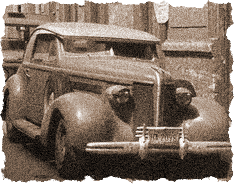
Old Photographic Style in Fireworks

Turn a new color photo into a sepia toned classic picture!

This tutorial teaches you how to give an old photographic style to an image.

Step 1

Paste an image on your canvas.

Step 2

With the image selected click on Filters>Noise>Add Noise. Set the Noise Amount to 15, tick the Color checkbox.

Step 3

Click on Commands>Creative>Convert to Sepia Tone.

Step 4

You can also give a torn-edged-effect like this.

Social Bookmarking
Bookmark to: Digg Bookmark to: Del.icio.us Bookmark to: Facebook Bookmark to: Reddit Bookmark to: StumbleUpon Bookmark to: Slashdot Bookmark to: Furl Bookmark to: Blinklist Bookmark to: Technorati Bookmark to: Newsvine Bookmark to: Blinkbits Information


domain names web design web hosting ecommerceblogging traffic building internet marketing web development

Home  |  Templates   |  Low Cost Solutions  |  Custom Services  |  Free Resources  |  Contact
Website Templates  |  Full  Flash Website Templates   |  Flash Intros  |  Logos & Corporate Identities  |  Swish Templates  |  Ecommerce Templates  |  CMS & Blog Templates
Copyright © 2004-2008 www.entheosweb.com - Entheos. All Rights Reserved.